

Introduction
Agentic AI systems are quickly evolving from simple chat interfaces into autonomous software capable of reasoning, planning, and interacting with real world systems. As more organizations begin to develop MCP in agentic AI systems, structured access to tools, APIs, and external services becomes essential. These systems often need structured access to external tools, APIs, databases, and files. Without a standardized interface, each integration becomes custom work. That creates fragile systems, inconsistent tool usage, and significant engineering overhead. A Model Context Protocol (MCP) solves this problem by providing a structured layer that allows AI agents to interact with external capabilities in a predictable and scalable way.
Businesses exploring production grade AI systems can also review our virtual agent development services to understand how Dev Entities builds scalable AI architectures.
In this guide we explain how to develop MCP in agentic AI systems, how the protocol works, and how to implement it in a production environment.
What is MCP and Why It Matters in Agentic AI Systems?
A Model Context Protocol (MCP) is a structured interface that allows AI models and agents to access external resources such as APIs, files, tools, or databases in a consistent format.
Instead of directly embedding tool logic inside the agent, MCP acts as a middleware layer that exposes capabilities in a standardized schema.
This allows the AI system to:
• Discover available tools
• Understand tool inputs and outputs
• Call external services safely
• Maintain context across interactions
In agentic architectures, MCP becomes the bridge between reasoning agents and real world execution.
Why You Need MCP to Develop Agentic AI Systems?
As agentic systems become more capable, they must interact with multiple services at runtime. This can include:
• Databases
• Enterprise APIs
• File systems
• Knowledge bases
• SaaS platforms
• Scheduling systems
Without MCP, developers typically hardcode integrations directly into prompts or agent frameworks. This approach quickly becomes difficult to maintain.
Using MCP provides several advantages.
Structured Tool Discovery
Agents can dynamically discover tools instead of relying on hardcoded integrations.
Consistent Input Schemas
Every tool exposes clear parameters that the model can understand.
Security Isolation
External systems can be accessed through controlled interfaces.
Scalable Agent Architectures
New tools can be added without modifying core agent logic. For production grade AI systems, MCP becomes a foundational architecture layer.
Core Components Required to Develop MCP in Agentic AI Systems
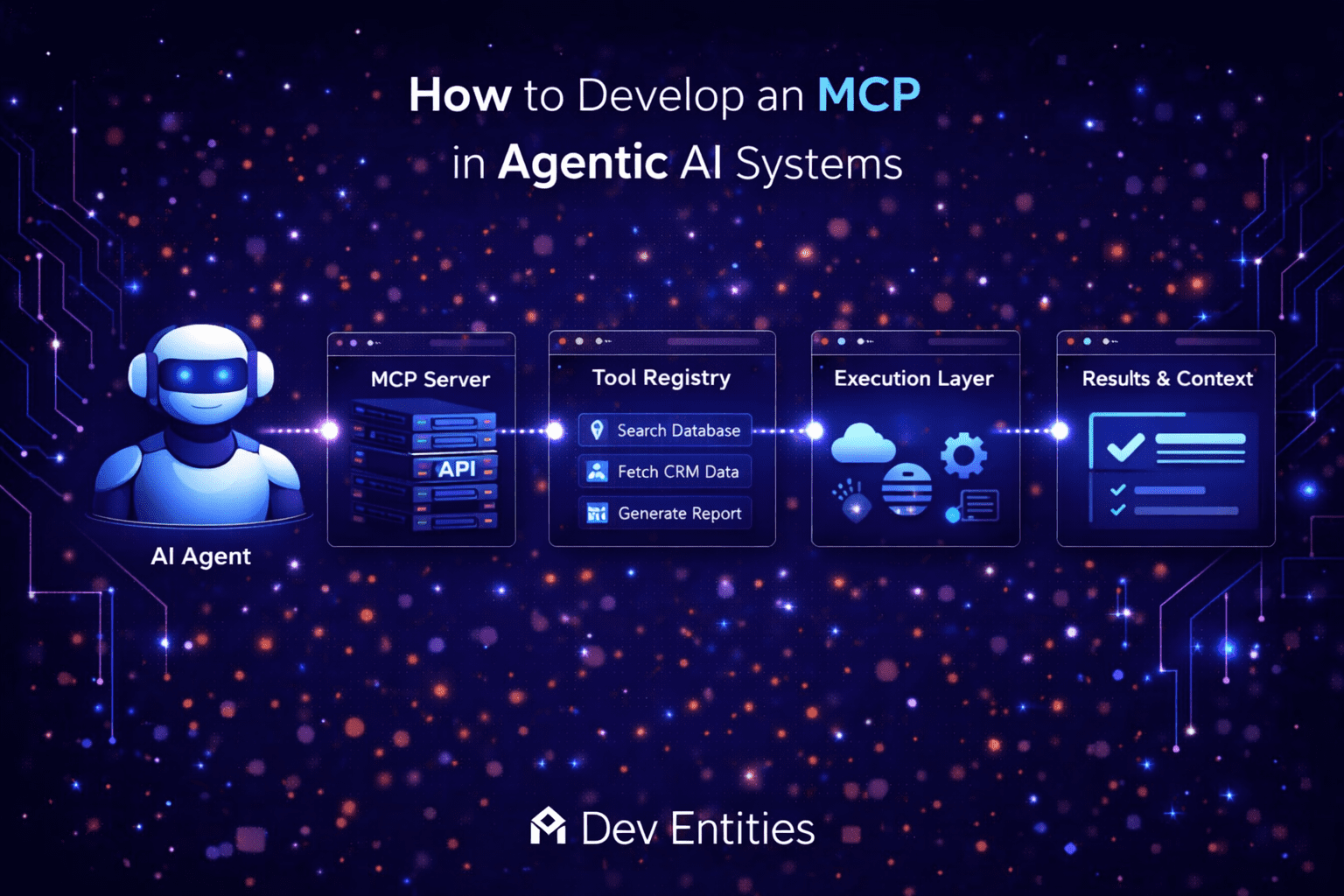
A well designed MCP architecture includes four main components.
1. MCP Server
The MCP server exposes tools and resources that agents can access. It defines:
• Available tools
• Input schemas
• Output formats
• Access permissions
Each capability is registered as a callable resource. Example capabilities:
• Search database
• Fetch CRM record
• Create calendar event
• Retrieve document
2. MCP Client
The MCP client sits inside the AI agent or orchestration framework. It communicates with the MCP server to:
• Retrieve available tools
• Validate input parameters
• Execute tool calls
Many modern frameworks such as LangChain or custom agent orchestrators can act as MCP clients.
3. Tool Registry
The tool registry maintains metadata about all tools available through the protocol.
Each tool includes:
• Tool name
• Description
• Input schema
• Execution endpoint
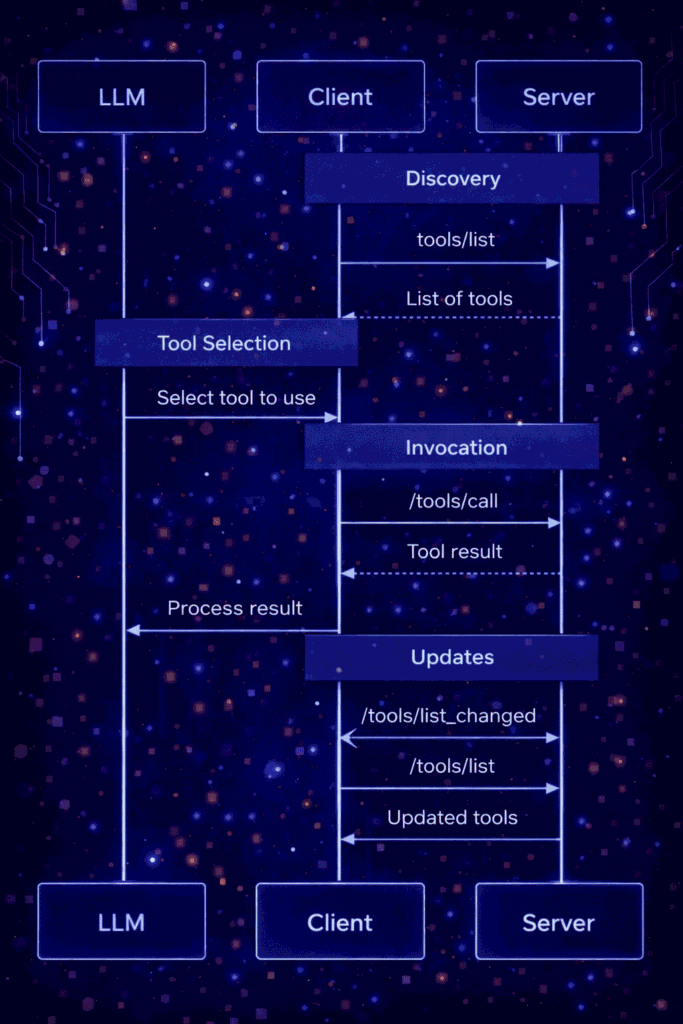
When an agent connects to an MCP server, it first queries the registry to discover available tools. The registry returns a structured list that the model can reason over when deciding which tool to invoke.
This discovery process is a core part of how Model Context Protocol systems remain flexible and extensible. Instead of hardcoding integrations inside the agent, new tools can simply be added to the registry.
MCP Tool Discovery Flow in Agentic AI Systems
The following diagram illustrates how an LLM, MCP client, and MCP server interact during tool discovery and execution.
Source:
https://modelcontextprotocol.io/specification/draft/server/tools
4. Execution Layer
The execution layer performs the actual task requested by the agent.
This could involve:
• Calling APIs
• Running scripts
• Querying vector databases
• Triggering workflows
The execution layer then returns structured results back to the agent.
Step by Step Guide to Develop MCP in Agentic AI Systems
Developing a Model Context Protocol layer typically involves five steps.
Step 1: Define the Tool Interface
Start by defining standardized tool schemas.
Example JSON schema for a tool:
{
  "name": "search_customer",
  "description": "Retrieve customer information from CRM",
  "input_schema": {
    "type": "object",
    "properties": {
      "customer_id": {
        "type": "string"
      }
    },
    "required": ["customer_id"]
  }
}
This schema allows the AI agent to understand how to call the tool.
Step 2: Build the MCP Server
The MCP server exposes tools through an API layer.
Common implementation stacks include:
• Python with FastAPI
• Node.js with Express
• Go microservices
Example FastAPI structure:
/mcp
  /tools
  /registry
  /execution
Endpoints may include:
GET /tools
POST /execute
Step 3: Connect the Agent Framework
The agent framework must be able to query the MCP server and call tools.
Typical flow:
- Agent receives user request
- Agent decides which tool is required
- MCP client validates tool schema
- MCP server executes the tool
- Results are returned to the agent
Step 4: Implement Context Management
Agentic systems must maintain context across tool calls.
This can include:
• memory stores
• vector databases
• session state
Popular tools include:
• Redis
• Qdrant
• Pinecone
• PostgreSQL
Context management allows the agent to chain multiple actions together.
Step 5: Add Security and Permissions
Production MCP systems must enforce access control.
Important considerations include:
• API authentication
• Tool permission scopes
• Rate limiting
• Request validation
This prevents agents from accessing unauthorized systems.
Best Practices to Develop MCP in Agentic AI Systems
When building MCP systems for real applications, follow these guidelines.
Keep tool schemas simple
Complex schemas increase reasoning errors.
Use strong validation
Always validate inputs before execution.
Separate reasoning and execution layers
Agents should decide actions but not perform them directly.
Monitor tool usage
Observability helps detect failures and hallucinated tool calls.
Final Thoughts
Agentic AI systems are moving toward architectures where reasoning agents orchestrate multiple tools and services. A Model Context Protocol (MCP) provides the structure needed to make those interactions reliable, scalable, and secure. By implementing MCP as a dedicated layer between AI agents and external systems, developers can build more maintainable and production ready agent platforms.